Master Project REPORT
A Client-side Profile Integrated Search Engine System
Advisor: Prof. Philip M. Lewis
Department of Computer
Science
State University of New York
at Stony Brook
July 2001
CONTENTS
Part
1 Introduction
1.1 Motivation
1.2 Related Work
Part
2 System Description
2.1 System Functionality
2.2 System Architecture
2.3 System Implementation
2.4 Graphical User Interface
2.5 Quick Search Display
Part
3 System Design and Implementation
3.1 System Database
3.2 Technologies and APIs Involved
3.3 Objects Components
3.4 Integrated Search Engine Implementation
Part
4 Testing Results and Future Work
4.1 Software Environment Setting Up
4.2 Conclusions
4.3 Future Work
 PART 1
INTRODUCTION
1.1 Motivation
There are a huge number of documents on the World
Wide Web, making it very difficult to locate information that is relevant to a
user’s interest. Search tools such as Lycos and Google index huge collections
of Web documents, allowing user to search the World Wide Web via keyword-based
queries. Given a query, such search tools search their individual index and
present the user with a list of items that are potentially relevant, generally
presented in ranked order. However large the indexes are, still each search
tool indexes only a subset of all documents available on WWW. As more and more
search tools become available, each covering a different (overlapping) subset
of Web documents, it becomes increasingly difficult to choose the right one to
use for specific information need. Metasearch engines have been developed to
help deal with this problem. We simulate real-life metasearch engines by
sending the queries and merging the results.
1.2 Related
Work
1.2.1 Existing Problem
Analysis
A
couple of reasons for this can be summarized as follows:
Unknown
Capabilities: Query capabilities of each engine differ
greatly from each other, but at the same time overlap a great deal. Keeping
track of these subtle differences is a very time consuming and tedious job.
Poor
Query Construction: Search engines will give the best
performance for well-constructed and detailed queries. It is not reasonable to
expect users to be familiar with the correct syntax, tags and delimiters
supported by different search engines.
Constant
Change: Like any source on the Internet, search
engines change their services and layout frequently. The change and/or
improvements may not be obvious in some cases. In any case, the user is faced
with the problem of learning about the changes in a timely manner, comparing
them with the existing services and evaluating their utility. This is a very
time consuming and counter-productive task.
Network
Delays: An important portion of the search time is
spent waiting for busy servers, failing to connect to server and trying to
connect to another server. Some engines provide search options only through a
sequence of choices made from the main page, resulting in a number of
connections before the query is submitted. Each connection adds a new delay to
the search process.
As
a result of the many differences of search engines, the users end up selecting
a few engines that offer them the best choices and familiarize themselves with
these engines by learning their intricacies. However, this leaves them
vulnerable to change and network delays. Moreover, interfaces can be too simple
or too complicated for users to use effectively.
1.2.2 Sever-side Integrated Search Engine
In
ordinary (non-"meta") search engines such as Yahoo!, AltaVista,
Google, etc., you submit keywords to their individual database of web-pages,
and you get back a different display of documents from each search engine.
Results from submitting very comparable searches can differ widely (about 40%),
but also contain some of the same sites (about 60%).
So,
Integrated Search Engine will be an effective way to solve these problems. In a
integrated search engine (or meta-search engine), you submit keywords in its
search box, and it transmits your search simultaneously to
several individual search engines and their databases of web pages. Within
a few seconds, you get back results from all the search engines queried.
Meta-search engines do not own a database of Web pages; they send your search
terms to the databases maintained for other search engines.
Currently,
there are many server-side integrated search engines, such as InfoSearch2000,
MetaCrawler, ProFusion, SearchCaddy, Seek123, WebFerret, etc. The trend is for
many search sites to offer not only searching and links to resources by subject,
but also many other services (stock quotes, airline tickets, shopping malls,
news links, games, chatrooms, free e-mail, and much more). The goal seems to be
to lure as many users to the site and keep them there as long as possible,
probably because the site's advertisers may benefit. And the functions and
information categories are restricted by each website, users can not get
whatever (news, articles, pages, etc.) they want on the web. So, client-side
profile system can be an interesting and useful attempt.
1.2.3 Client-side Integrated Search Engine
Our
client-side profile integrated search engine provides users with assistance
when managing their personal information spaces. This assistance is
user-specific and done by software agents. Users delegate tasks to web
assistants that perform actions on the their views of the WWW, on the WWW
itself, and the history of all user actions. Our integrated search engine
architecture combines the capabilities of search engines. It facilitates
construction of complex search queries with the help of a uniform interface,
transforms the queries by relaxing them when necessary to queries that can be
supported by search engines, translates relaxed queries to the specific query
language syntax used by different systems and executes multiple search requests
in parallel to improve query response time. It is a flexible and extensible
system that adapts to the changes in the search engines and provides users with
customization options for developing specialize query interfaces.
Since
user’s profile including search content information, search engines and system
configuration all are stored in database, it is convenient for user to store
and retrieve them very easily. And if the computer is shared, multiple-user
management system can solve the security and privacy problems.
In a word, our Client-side Profile Integrated Search Engine (CPISE) is an integrated interface to search engines on the Internet. It is a pure client-side software system, which is not restricted by any web server or network service. It facilitates easy construction of advanced search queries, automatic translation of user queries to correct search requests for multiple search engines and parallel execution of these requests.

SYSTEM DESCRIPTION
The
goal of this project is to build a client-side integrated search engine that
provides a uniform and easy to use interface to a multitude of search engines,
simulates the search procedures including query transform, translation, execution,
results collection, parse, reformat and display like the server-side integrated
search engines or meta-search engines do.
2.1 System
Functionality
Uniform
and Customizable Interface: CPISE uses a uniform interface that resembles the interfaces provided
by the search engines. The main difference is that it contains a collection of
search boxes for different search engines and explicit drop-down menus for
specifying an amalgamation of the options supported by the search engines.
Hence the users are given the opportunity to specify detailed queries or search
engines with very little effort. Furthermore, the interface is customizable. It
allows the addition of different options and deletion of unused options to make
the interface suitable to the user’s need. And multi-user login system allows
different users to manage their own profile settings and system configurations.
Query
Transformation:
CPISE has its own uniform query interface. However, different search engine has
its different formulation of complex and detailed queries. CPISE uses a
built-in query relaxation scheme to find the most detailed queries that can be
supported by a search engine. Furthermore, CPISE will automatically translate a
search query to the correct HTTP request message for each engine.
Multiples
Query Execution: CPISE is not a search engine, simply an interface to many others.
CPISE is able to consult many search engines for a single query at the same
time by reducing the time spent on accessing different search engines,
re-formulating the same query and waiting for response. Instead, CPISE will
start receiving results from a query as soon as a search engine sends back a
reply and it will keep receiving query responses from different engines and
storing them even if the user is idle browsing through the available results.
2.2 System Architecture
The main architecture of the CPISE
system is shown in Figure 1. The java-based CPISE system is built to run on the
user’s system preferable with a java web browser plug-in or with external browser
outside like Internet Explorer or Netscape.
The
Query Interface of the system is the main interface which invokes
the SPISE Query Engine. Whenever a query is executed, the
Query Engine dynamically generates an HTML page containing query results. The HTML
results can be displayed in the Web Browser (Widget) embedded in
system interface or displayed in the external browser (Internet Explorer or
Netscape). Both of these interfaces communicate with the Query Engine. User can
manage his own search profile (like bookmark in browser) easily and
conveniently by profile editor. Surf Advisor will
provide functional options for more personally searching, such as maximum
response time specified, AD filter and smart bookmark, etc. All these user
profile and system configurations will be stored in the User Profile
database (currently, we use Microsoft Access), which is connected to SPISE
system by JDBC-ODBC Bridge.



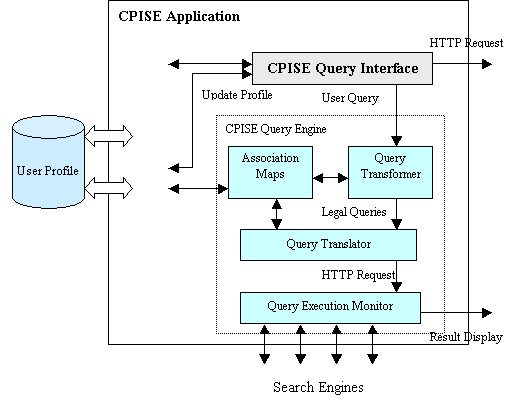
Figure 1: Architecture of
the CPISE
Association
Maps:
Association maps constitute the knowledge base of the SPISE system. They contain
information about the capabilities, limitations and access patterns of
different search engines. Search support specifications, texts for the query
forms and other tables used in the translation are stored in association maps.
Query Transformer: The main function of the
transformer is to relax user queries to find a set of maximally supported
queries. The query transformer will take as input a search query and produce as
output a set of (relaxed query, query form) pairs.
Query Translator: The job of the Query
Translator is to take the output produced by the Query Transformer and
construct the HTTP request messages need to submit these queries. Hence, the
translator will take as input a pair containing a filled query form and a
relaxed query and produce as output a HTTP request message by filling the query
form with the appropriate values and syntax. The query translation process
involves invoking certain external functions for formatting input strings and
filling in different values using base tables stored as part of the association
maps.
Query Execution Monitor: The Query Execution
Monitor is responsible for monitoring the execution of the HTTP requests and
reporting the results to the user. The monitor will submit all the HTTP
requests it receives from the translator and dynamically create a new interface
containing the results received within the first t seconds and present them to
the user. The monitor will actively receive query answers and update the
results page. The updated results page will be available for the user to load
any anytime by using a reload button provided in the browser or double click on
the according profile node of User Profile Tree in the Profile Editor
interface.
Profile Editor: In the Profile Editor, user can customize the
search profile whose attributes he wants to search on and include only those
attributes in this version of the SPISE Query Interface. As a result of a
customization request, new association maps will be computed using the central
association database and sent back to the user as a system upgrade. This
process involves the selection of the necessary entries for the base tables and
attributes orderings and the simplification of search support specifications to
include only the necessary attributes.
2.3 System
Implementation
The SPISE system is a client-side java-based application developed with Sun's Java technology. The reasons why we choose java as our development language are: java has many APIs with very good performance to support network programming; java is an OO language, which makes it easy to integrate into any java application; java application can be re-implemented in different Operating System very easily.
Current SPISE system integrates the functionalities of the following search engines: Google, Excite, AltaVista, Lycos, Yahoo!, MSN, About, Netscape, NBCi. An important portion of the development effort was spent on learning the details of search engines. Usually, the documentation on query syntax and capabilities of engines is not complete and in some cases does not explain of the actual behavior of the engines. In some cases, the treatment of search queries was not uniform across different engines. All of this seemed to justify the need for an intelligent or at least informed system to guide the search engine use. And another important portion is to parse the search results from different search engines, and rewrite the HTML page into a clear, non-duplicate, high efficient and attractive format. Obviously, the search result HTML page of different search engines has totally different format, so we need to build Association Maps for parsing result page and Query Execution Monitor for receiving response pages automatically and rewrite the web page with uniform format. So, one of the important challenges is to develop a sophisticated monitoring system that can interpret the results returned by search engines and support multi-pass protocols between the engines and the monitor.
The following figure is the simplified structure of integrated search engine with four parts: Search engines, Filter, Synthesis and Browser.
Search Engines: Real-life search engines are of so much
importance to the internet users right now. However, according to a recently
study, no single search engine covers more than 16% of the total. By searching
multiple search engines simultaneously via a metasearch engine, coverage
increases dramatically over searching only one engine. We simulate the
real-life search engines like Profusion by sending the query to multiple search
engines in parallel and merge the returned results after duplicate removal.
Duplicate Removal: Since the search engines overlap in the web
pages they index, it is highly likely that the returned result could share
identical URL. So, duplicate removal is necessary here.
Merge: Returning
results are ordered according to the rank order from the original search engine
and the search engine confidential value. From the report of some metasearch
engines, they claim to get the raw score from the search engine somehow.
However, from our study, only very few search engines(one example is
northernlight.com) return the percentage value of the results. So, we have to
go with the rank returned from search engines which is surely much more coarse
than raw score if it exists. Since the aim of our project is to simulate the
mestasearch engines, the rank still makes good sense here.
Browser: Internal browser is not only for displaying the search results, but also used as a normal browser like Internet Explorer or Netscape. At the beginning, we tried Class JEditorPane in graphic package Swing of Java2 APIs, which supports text/html content type, and provides hyperlink support by generating hyperlink events. However its display and function performance is unsatisfiable. So, we went to IceStorm Browser classes package instead, which is a Web browser component developed with Sun's Java technology. It can be integrated into any Java application and be deployed in an Internet appliance design, such as a Web tablet, Internet screenphone, or digital set-top box.


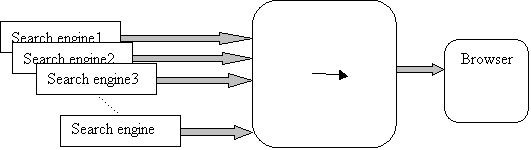
Figure 2: Simplified Structure
of Integrated Search Engine
2.4 Graphical User Interface
The system GUI is briefly
like what Figure 3 shows below.
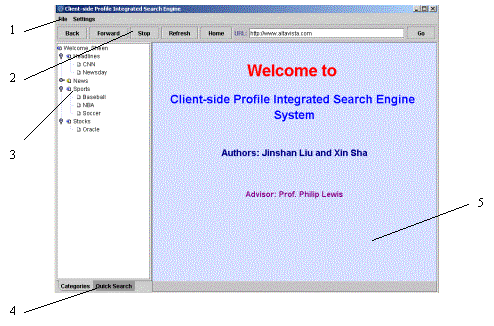
Figure 3: System Main GUI
The SPISE system graphical
user interface consists of five main parts:
2.4.1 System
Menu
As shown in Figure 3, the
system menu is at the top of the system GUI. Specifically, the "File"
option provides user sign-in, sign-out actions that user login and logout in
multi-user system, and the "exit" action that terminates the whole
client-side application; "Setting" option provides browser and user
configuration setting functions.
2.4.2 Top
Control Panel:
The top control panel is
located right below the system menu, which consists six buttons and one URL
input text field. There are six buttons include “Back” button to browse
previous web page, “Forward” button to browse next web page, “Stop” button to
stop the current web page loading, “Refresh” button to reload the web page of
current URL, “Home” button to browse the home page, “Go” button to browse the
web page located in the URL text field. And the URL input text field is to
input the URL to browse.
2.4.3 Profile Tree
Profile tree is located right below the top control panel and left to
the browser. It is used to store, edit the user personal profile setting, such
as search attributes and integrated search engine configuration. In multi-user
system, its content is managed by different use.
2.4.4 Quick Search Panel
Quick search panel is on another page of the left JTabbedPane. It is to used for quick search, and provides ten search engine options including Google, Excite, AltaVista, Lycos, AllTheWeb, MSN, About, Netscape, NBCi.
2.4.5 Browser
Browser is right below the
top control panel and right to the profile tree and quick search panel. It is
to display the search results and also can be used as a normal browser.
2.5 Quick Search Display
The following figure 4 shows
below is a quick search sample.
2.5.1 Search Panel
Search panel is located on
top of the JTabbedPane on the left side of the system GUI. It consists of an input text field
that is to input keywords that user want to search and a search button that is
clicked to start searching action.
2.5.2Search Engine Option Panel
Search engine option panel
locates right below the search panel. It provides nice (currently) search
engines that can be chosen to search the keywords.
2.5.3 Brief Search Results Browser
Brief search results browser
is right below the search engine option panel. It displays the links of search
results from top to down, each link can be clicked and active the right detail
search results browser to display the details.
2.5.4 Detail Search Results Browser
The detail search results
browse is on the right center of the system GUI. It is to display the search
results in details such as the topics, brief descriptions, URLs, search engine
sources and result ranks, and it also provide the hyper-link to browse the
result web pages.
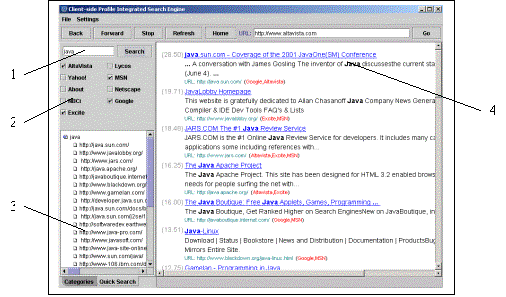
Figure 4: Quick Search
Display

SYSTEM DESIGN
3.1
System Database
The following figure 5 shows below is E-R model of system database.
Currently, because of the development environment restriction, our test
database we choose is the Microsoft Access 2000.
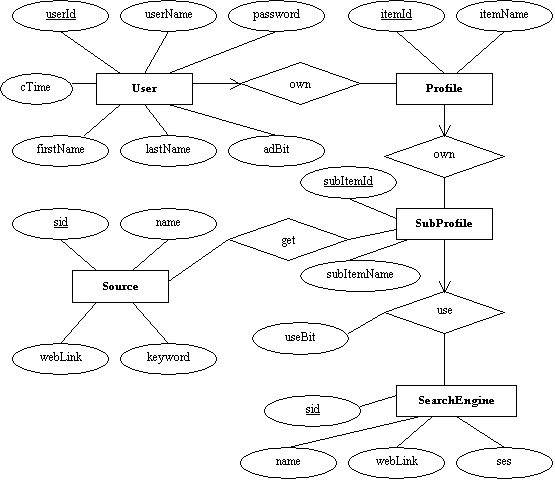
Figure 5: E-R Model of
System Database
3.2
Technologies and APIs Involved
The whole system is based on Java 2
Platform Standard Edition development library that allows developers to easily add
collaboration features to applets and applications written in the Java
programming language, and IceStorm Browser Java packages that is a Web browser
component developed by Wind River System Inc.
The architecture of system packages
and classes is briefly like what Figure 5 shows below.
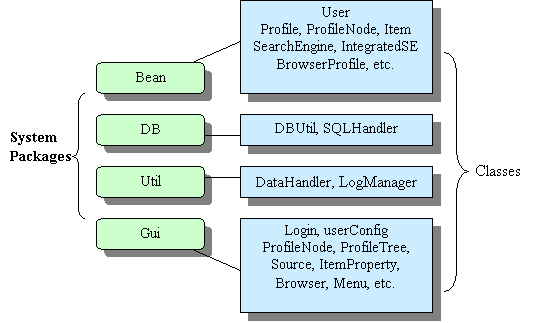
Figure 6: Architecture of
System Packages and Classes
Packages Bean: It contains all
the java beans that store all information needed for system, such User,
Profile, SearchEngine, BrowserProfile, etc. Objects of Beans will be passed in
system, such as between Database JDBC objects and GUI objects. The greatest
advantages to use beans is that database details are transparent to system GUI
classes. When we change the architecture of database, we don’t need to change
the GUI classes one by one, but only need to change the bridge class –
SQLHander and DataHandler for new changes.
Package DB: It contains all the
JDBC classes and provides the access to system database.
Package Util: It contains all
the classes and methods to handle the data not only from DB package but also
from other classes including GUI and Bean packages.
Package Gui: It contains all
the graphical user interface classes that provide the graphical components,
user and system event handlers, and search results format and display. IceStorm
Browser classes are also in this package, which provides the HTML page display
interface, navigation handler and property change-event and hyper-link event
handler.
3.3 Object Components
3.3.1 Bean Objects
Profile: To store all information of the use
including search profile, search engines, browser and user configuration.
BrowserProfile: To map the Browser table in
database.
ProfileConfiguration: Profile Architecture in profile
tree.
Item: To store the profile node
information in Profile Tree of system GUI.
Search
Engine: Search
Engine setting, such as web link, post/get method, etc.
User: User’s personal information, such as
username, password, etc.
3.3.2 DB Objects
DBUtil: Basic database access JDBC methods,
such as connection, query execution.
DBHandler: All detail SQL
execution methods for each table in database, such as insert, update, delete,
and select actions.
3.3.3 Util Objects
DataHandler: All data handler methods, such as
converting data got from DBHandler to Bean objects, or doing some data
configuration and translations.
LogManager: To manage the
log file for system recovering and testing.
3.3.4 Gui Objects
Browser: Main GUI of system.
BrowserConfigDialog: Dialog of browser configuration.
Hit: Search results display.
ItemPropertyDialog: Dialog of profile node property
configuration.
MyDocument: Search Engine maps.
MyJMenuBar: System Menu.
MyJPanel: JTabbedPane of profile tree and
quick search.
MyJPopupMenu: Popup menu by mouse right click.
Source: URL source of each search result in
HTML format.
TopPanel: Top control panel for navigation of
browser.
UserConfigDialog: Dialog of user information
configuration.
3.3.5 IceStorm
Browser Object
The internal browser is
implemented abased on Ice Browser developed by WindRiver, Inc. Specifically, it
contains the following components: StormBase, Pilot and Scripter.
StormBase
This is the core component of the
ICEBrowser structure. All the controls with the browser happen though this
component. Instantiate the StormBase
object is the first step for starting a browser. In order to show the browser,
the StormBase object is always provided with an AWT/Swing Container.
The StormBase provide top-level view
port creation. It stores a list of top-level view ports, which each respond to
a HTML frame or frameset. Each top-level view port has a graphical container
associated with it.
StormBase also manages the list of
currently running pilots and scripters.
Pilots
Pilot is the rendering module, which
is responsible for the actual rendering of the html content. A pilot has a
tight integration with the underlying browser system to provide a better
support for displaying content.
The implementation of a pilot depends
only on main Storm classes and on the low-level library used. The html4 pilot
is a pilot come with the ICEBrowser bean API package. It builds the DOM
representation of html documents. The ice.pilots.html4 package implements the DOM level 1 specification.
For the purpose of setting up complex
web pages, the IceStorm Architecture provides a notion of a view port. A view
port is an equivalent of an html-frame (or html-frameset) usually make on a web
page. A plain view port (similar to html-frame) can serve as a container for a
pilot. The view port is not a graphical component; it just has a reference to
the pilot. The view ports could tightly integrated with the html rendering. It
also allows displaying various content in the same view port by just changing
the pilot.
Scripters
A scripting module the rendering
module for the scripting language it supports, it knows how to execute commands
in the scripting language and allows pilots to expose themselves (via
ScriptDrivers) into the scripting environment without being dependent on a
particular scripter.
Synchronization
The goal of collaborate browsing is to
provide a communication between customers and customer representatives by
sharing HTML pages info and mouse movement. From the programming point of view,
the mouse movement and browser content need to be synchronized.
1.
Static
Web content: The HTML pages could either be static and dynamic web pages.
Static page could simply be represented by the URL. Since the VB Script and
Java Script is executed at the client side and web pages having scripts can be
represented by URL, the scripted web page is also treated as the static web
page in here. For the static content in the browser, only the URL is
synchronized between client and the browser.
2.
Dynamic Content:
The dynamic content refers the web content generated by CGI, ISAPI, Servlet
program or ASP and JSP. They are actually output of programs running on the
server side, and it is usual to be invoked by HTTP get or post method. For
the get method, the URL could also be represented by a URL string as long as
security is not a concern. For the post method, the web content cannot be
represented by a URL since it depends on the data transferred from the client
to the server.
o
Get
method: In this case, the web content is represented as a URL string, and only
the URL of the browser is synchronized between client and server browser.
o
Post
method: The synchronization is complicated in this case. The whole browser web
content is synchronized. Since web page can be represented using DOM structure
and in ICE Browser bean, it is a document class in the pilot, only status and
attribute of classes relative to representation of the HTML pages will be
synchronized. In this case, the pilot, view ports, and scripters in the browser
bean will be synchronized.
o
Mouse
Event: The mouse event will be helpful for communication between customers and
customer representatives. In this program, mouse movement and click will be
synchronized. But since at any moment, only one side can drive the browser, the
mouse movement and click caught on the control side will be replayed on other
side, it will show differently with the local mouse event without interfering
with the local mouse control.
The main program in this
module is the shared browser that can catch and show the mouse movement and
show the html pages on both sides. The server side and client side have the
same components except that the server side by default controls the browser and
has priority over the client side for the controls.
When the shared browser is
open, the customer representative always has the control, and he/she can show
the customer how to use the browser.
The client side can see the web content, and the operator’s mouse movement
and click, the mouse inside the browser will show differently with the mouse in
the customer machine. Customer can ask the control of the browser by pushing
“asking control” button and the operator is notified, once operator agree by
click “yes” for the dialog, the customer will has the control of the browsing,
at any time, the operator can take the control back. The interface will be like
a simplified browser except it has additional AWT components for the control
switch.
The server side and client
side will be synchronized for the web page URL, mouse position and click. Thus,
only the web page URL and mouse position and event will be transferred back and
forth through the Internet. The transferring is one way. If the customer
representative controls the browser, the server side will keep sending URL and
mouse information to the client side.
The communication between
client and server will be implemented by Java Shared Date Toolkit, the Data
Object is used to synchronize the web browser content, and the Token is used
here to implement exclusive control of the browser.
3.4 Integrated Search Engine Implementation
CPISE accepts a single query from the user and sends it to multiple
search engines in parallel. The current implementation of CPISE supports the
following search engines: Google, Altavista, About, MSN, Netscape, Yahoo,
Lycos, NBCi and Excite. The user could select search engines, and the search
results they return are further processed by ProFusion. The post-processing
includes removing duplicates and merging the results to produce a single ranked
list.





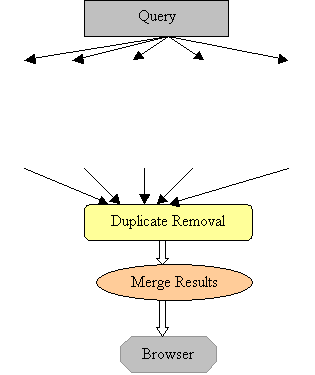
Figure 7: Procedure of
Searching
3.4.1 Formation and Submission of queries
Every search engine query could be accessed via GET method. We need to form syntactically correct queries by composing the URL with the search engines and the Keyword and Options.
For example, Google, the
right URL is in the form as: http://www.google.com/search?q=Keyword,
Or http://www.google.com/search?q=java&hl=en
which defines the language which is English for this case,
Or http://www.google.com/search?q=java&hl=en&start=10
which returns the results from rank 11.
3.4.2 Parsing
of the returned results
The returning “things” from search engines are web pages in HTML, which
is mixed by the information we are interested in and the description
HTML tag like
<B>. And HTML pages returned by a
search engine are fixed in format for some time (on condition that the search
engine programmers do not change their ideas too often), so the parsing work
could be only done according to the current format of the respective search
engines.
3.4.3
Duplicate removal
After parsing, we get the hits from search engines in order. Since the underlying search engines overlap in the Web pages they index, it is highly likely that they will return some of the same pages in response to a given query. So we attempt to remove these duplicated pages, using a few simple rules.
There are basically 3 cases
for duplicate URLs:
(a)
The
simplest case is when the identical URL has been returned by multiple search
engines. Clearly, if two items have exactly the same URL, they are duplicates.
(b)
More
complex rules are necessary to handle the case where identical page is
referenced by slight variations on the same address.
For
example: http://server and http://www.server/
Or http://server/
and http://server/index.html
Handling
(a) and (b) removes approximately 10-20% of the retrieved URLs.
(c)
However,
duplicates may also occur because multiple copies of the same page may exist at
different locations. This occurs when people are doing mirror sites or mirror
pages.
In
this case, web page’s contents need to retrieved and compared which would
increase network traffic and might be substantially slower. So in our project
(and also in many real-time metasearch engines), this case is simply ignored.
3.4.4 Ordering
results
This could be the most
important part of the metasearch engines and actually how to best merge
individual ranked lists is an open question in searching distributed
information collections. Callan[Callan et al. 1995] evaluated merging
techniques based on rank order, raw scores, normalized statistics, and weighted
scores. He found that the weighted score merge is computationally simple yet as
effective as a more expensive normalized statistics merge. Therefore, in this
project, we use a weighted score merging algorithm which is based on two
factors: the value of the query-document match reported by the search engine
and the estimated accuracy of that search engine.
For a search engine i, we assigned its confidence factor CFi. For real-life metasearch engines, CFi is
evaluated by its performance over some queries(for example, 25 for profusion).
The CFi reflects the number of total relevant documents in top 10 hits and the
ranking accuracy for those relevant documents. More work is done to systematically
calculate and update the CFis, particularly developing CFis which vary for a
given search engine based on the domain of the query.
Due to the size of our project, we cannot have a server standing in background doing the statistics collecting for us, we simply simulate the real-time by assigning the CFi fixed values. And the rank represents the score from the search engine. So we develop a formula calculating the final score of the hit j:
Score j=∑ CFi*(0.5+1/rank j)
i
So the more engines index it, the higher score the hit has. And the
higher rank the hit enjoys, the higher score it has.
The document’s final rank is
then determined by merging the sorted documents lists based on their final
score.
3.4.5 Search
Result Presentation
The merge process described in the previous section yields a single sorted list of items, each composed of a URL, a title, a score and a short summary. These items are then displayed to the user in sorted order.
3.4.6
Other Implementation details
Our project is written in Java and portable to any Unix platform. It
contains one Java method for each search engine (currently 8) which forms
syntactically correct queries and parses the search results to extract each
item’s information. Due to its module future, it is easy to extend to
additional search engines.
The main process creates multiple parallel threads, and each thread
sends a search request to one search engine and extracts information from the
results returned by the search engine. The main process begins post-processing
when all threads terminate by returning their results or by timing out.

PART
4
CONCLUSIONS AND FUTURE WORK
4.1 Software
Environment Setting Up
After finishing the installation of the Java
software package, we should correctly set up the environment variables: PATH
and CLASSPATH as follows:
1.Set CLASSPATH
set CLASSPATH=%WINDIR%\java\classes\icebrowser\ic5core.jar;%WINDIR%\java\classes\.jar;%WINDIR%\java\classes\icebrowser\ic5util.jar.jar;.;%CLASSPATH%
2. Set PATH
set
set PATH=%WINDIR%\System32;%PATH% (on Windows NT)
set PATH=%WINDIR%\System;%PATH% (on Windows 95/98)
The setting of PATH and CLASSPATH varies on different computers and
different versions of Windows OS. We just present an example of such setting as
above.
After the environment setting up, the client-side application and server-side application can be executed by typing commands under MS DOS as follows:
java Browser
4.2 Conclusions
In this report, we
described our client-side profile integrated search engine architecture. This
system has a uniform interface that facilitate the construction of queries, a
query relaxation architecture, a sound query transformation method for finding
most detailed queried that can be supported by search engines, and a flexible
system for specifying the syntax of query languages used by search engines. The
main contribution of the project is a testing way for mapping complicated query
capabilities of resources and query results to a uniform and flexible
interface.
After finishing the implementation, we have performed extensive testing
on the system. We used many keywords in different region to test the
correctness, speed and efficiency of our integrated search engine compared with
other non-meta search engines, and adjust the search schema formula with the
experience increment. To our pleasure, the testing results are basically
satisfactory.
4.3 Future Work
CPISE is a client-side application with no big servers on the background doing indexing and statistics computation, so it
could not hardly achieve the performance of those real-life metasearch engines
though we have turned over every stone to simulate them.
Future research directions could include
(1) Information retrieval from the web. The manual parsing method we are
applying now could lead to changes of code if the web pages structure from
search engines has some changes. There
is some research underway to extract semi-structured information from the web,
which uses declarative specification that states where the data of interest is
located on the web pages.
(2) Ordering of final results. The confidential
value of each search engine could be calculated more accurately if some
statistics like user experience could be obtained.
(3) Construction
and relaxation of structured and complex queries.